Accounting Reports
Activity
Account Trans. Detail by Date Range [ACC01A] Report
Navigate to Report ➜ Report.
Select Accounting from the drop-down menu.
Select Activity from the Section drop-down menu.
Select Account Trans. Details by Date Range [ACC01A] from the Reports drop-down menu.
Enter the details in the applicable filters under the Filters section.
Report Parameters
|
Field |
Description |
|---|---|
|
Period |
|
|
Period |
Select a predefined date range to quickly set the reporting period. Available options include commonly used ranges such as Today, Yesterday, Current Week, Last Week, Current Month, Last Month, Current Quarter, Last Quarter, Current Year, Last Year, Next Week, Next Month, Current Financial Period, and Last Financial Period. Select Custom to manually define the date range using the Start Date and End Date fields. |
|
Start Date |
Select the start date for the report using the date picker. The report includes transactions from this date onward. |
|
End Date |
Select the end date for the report using the date picker. The report includes transactions up to and including this date. |
|
Filter |
|
|
Account Categories |
Select account categories to filter the report. |
|
Chart of Accounts |
Select account structures to filter the report. |
|
Departments |
Select departments to filter the report. |
|
Source |
Select transaction types or sources to filter the report. |
|
Customer |
Select customers to filter the report. |
|
Supplier |
Select suppliers to filter the report. |
|
Locations |
Select locations to filter the report. |
|
Exclude |
When selected, excludes records that match the chosen filter. |
Click Generate Report.
Sample Report
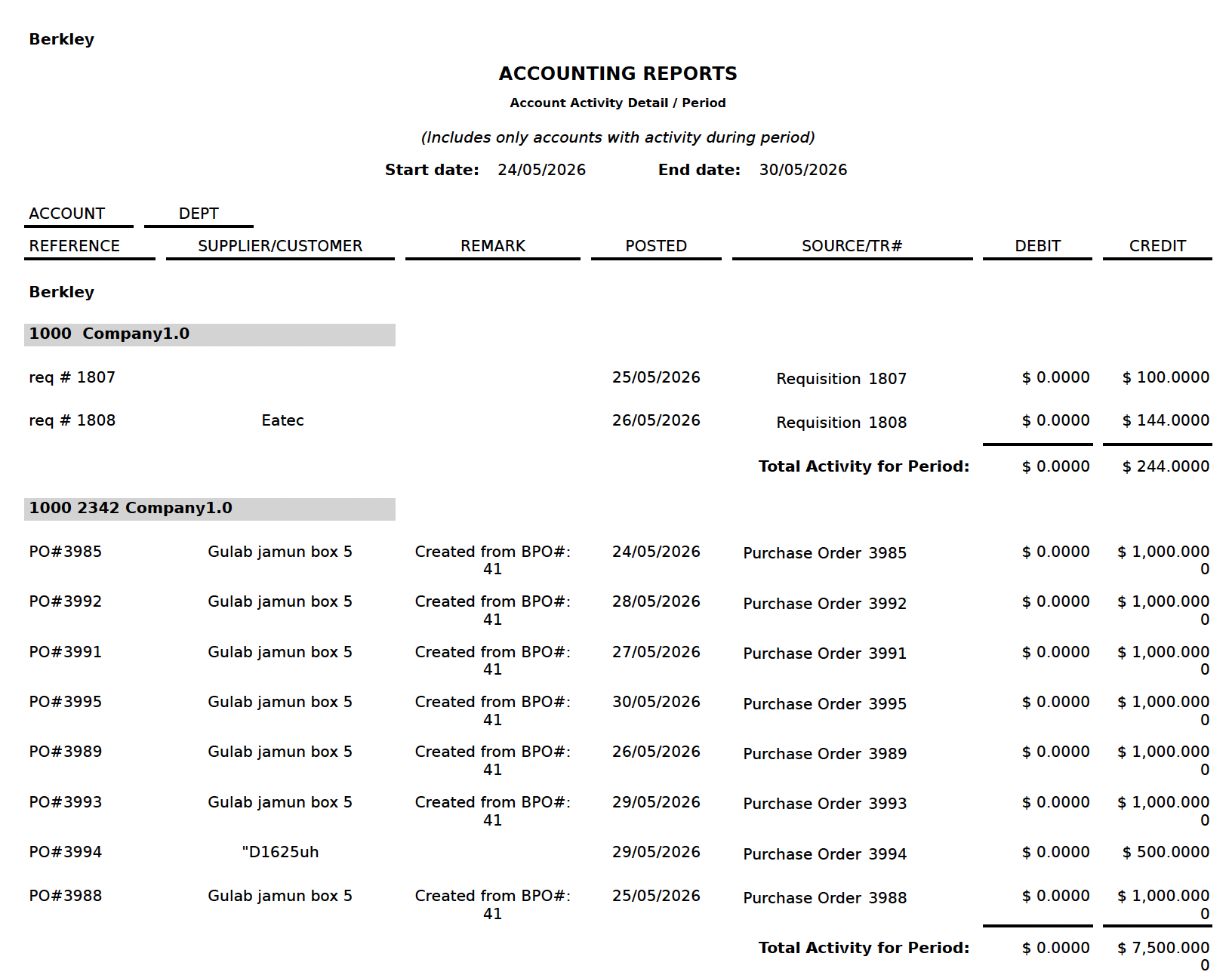
Report Fields
|
Field |
Description |
|---|---|
|
Account |
Displays the account code and name. |
|
Dept |
Displays the department associated with the account, if applicable. |
|
Reference |
Displays the transaction reference number. |
|
Supplier/Customer |
Displays the supplier or customer linked to the transaction. |
|
Remark |
Displays notes or comments related to the transaction. |
|
Posted |
Specifies the date when the transaction was recorded. |
|
Source/TR# |
Displays the source document or transaction reference (for example, Requisition or Purchase Order). |
|
Debit |
Displays the debit amount for the transaction. |
|
Credit |
Displays the credit amount for the transaction. |
|
Total Activity for Period |
Displays the total debit and credit amounts for the selected period. |